For anyone working with design, there’s a constant pressure to deliver great work, on time and on budget.
To deliver that quality work, you need a few things. You need the design skills to create work that will have an impact. You need to get the budgets required to devote the resources needed to deliver. And, of course, the client’s timely feedback and approval – if you want to get the creative delivered on time. That last step can be tricky without a good system in place.
Delayed feedback, late approvals, extra revisions, miscommunication, and other issues, often well beyond your control, all eat into creative speed and quality. This is true whether you’re a designer working as a solo creative, in a large enterprise, or in a global agency.
With multiple reviewers and approvers, barrels of feedback, and tight deadlines, you need a system that works to eliminate any issues and allows you to deliver your best design work. That’s where online proofing systems for graphic designers come in.
What you need is a system specifically built for creative workflows, faster feedback, and fewer miscommunications.
Why Graphic Designer Need a Specialized Proofing Solution
Often, the instinct is to use your existing stack to manage review and approval. Managing design workflows inside your content creation (or communication) platforms will only lead to headaches. Here’s why working without tools built for online proofing for design work is less than optimal.
The Wide Range of Formats
While integrated commenting options in content creation tools can work for simple conversations, it’s not typically the best option when multiple tools, iterations, or stakeholders come into play. And having to proof PDFs, Figma boards, Photoshop files, videos, images, or websites on different platforms and different tools is time-consuming, messy, and effort-intensive.
Centralization
Having a single source for creative proofing makes a huge difference. While a PM tool can handle projects, it doesn’t handle the micro-task or content management as well. Nor do content creation tools.
The Need for Precision
It’s incredibly difficult for stakeholders or clients to provide precise, targeted feedback on elements like typography, layout, whitespace, video frames, and pixels without a purpose-built proofing tool. Trying to do it all in creative creation or communication platforms can lead to vague, imprecise, and unclear feedback.
Feedback Organization
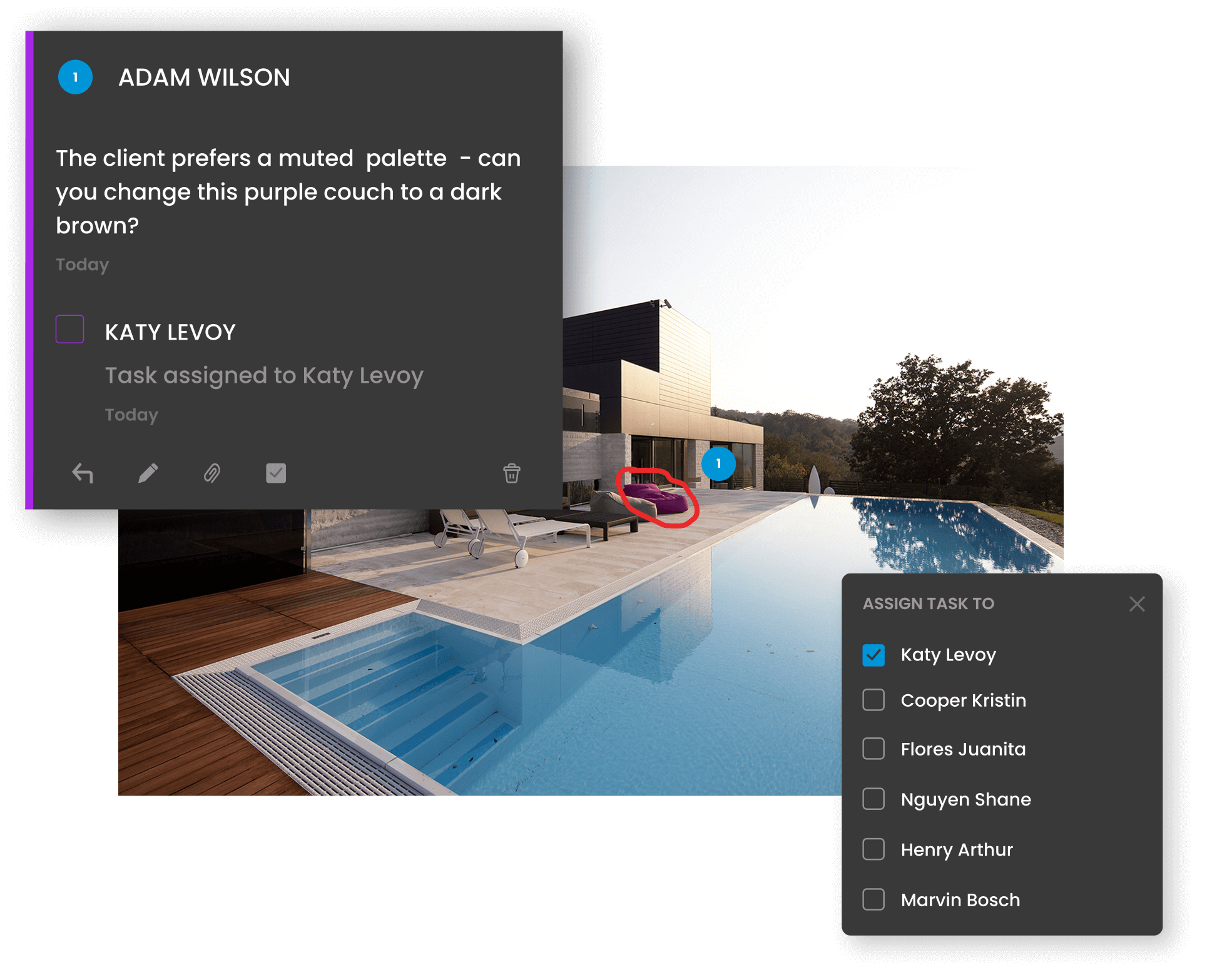
The commenting tools found in content creation tools tend to lack key features to organize feedback. Some will allow for threaded comments and mentioning. But how about labelling comments? Or sorting and filtering feedback? Can you assign feedback as tasks to other users? Add attachments?
Version Organization
A major missing element in creation tools is managing revision cycles. Quickly uploading and comparing versions is not always possible. Without robust version control features to manage multiple rounds of development, confusion can quickly derail things.
Integrated Approvals
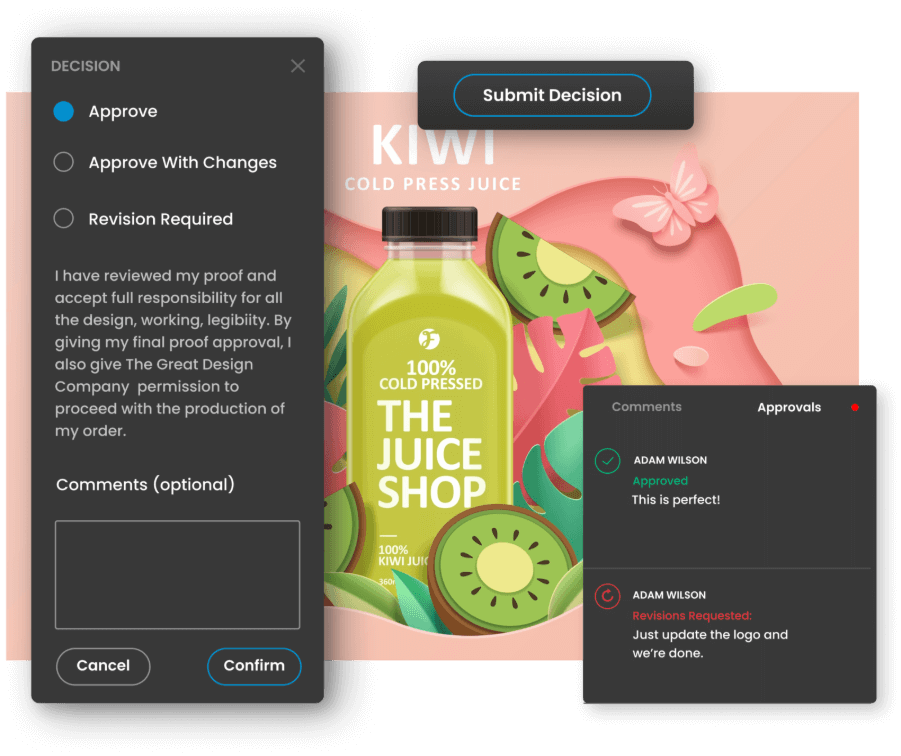
Approvals are often overlooked as a critical feature of the creative workflow. Usually, it’s an email or even a meeting. Which is fine, except it’s not transparent to all stakeholders and doesn’t encourage accountability. Integrated approvals, on the other hand, mean that down the road, when you are wondering which version is approved or who gave the approval and when, it’s clear.
Differences Between Stakeholders
Teams often deal with stakeholders who have varying levels of tech savviness. What works for one might not for another. An intuitive and standardized system with specialized tools, version control, and support for all formats makes the process easier and more precise for teams and stakeholders alike.
How an Online Proofing System for Graphic Designers Streamlines Review and Approval
Here are just some of the ways online proofing for design teams can smooth out the review process.
1. Centralized Feedback
Reviewers comment collaboratively directly on files, rather than via endless email threads, comments spread across five different tools, or by marking up offline files.
This means feedback is consolidated and contextualized, reducing the need for the team to engage in constant back-and-forth to clarify points. Discussions happen on one platform with threaded comments.
Different file types can be reviewed together, giving everyone a big-picture overview of the entire project.
2. Graphic Design-Specific Feedback Features
Graphic design proofing software provides design-specific tools for tailored proofing experiences across a wide range of assets.
For instance, ReviewStudio offers:
- Annotation and markup tools tailored to different formats
- Multiple shapes, colors, and markup sizes for accuracy and flexibility
- Multi-page views for catalogs and brochures
- Tools to inspect visual elements like color, size, typography, and barcodes
- Color separation features for files with CMYK layers
- And more
3. Version Tracking and Change History
Version control keeps your team and all stakeholders on the same page. With drag-and-drop uploading of new versions, it’s easy to upload multiple revised files in one go. And it’s easy to compare old and new designs side-by-side, speeding up decisions and eliminating ambiguity.
Having that full project history helps to promote accountability, as there’s transparency about who made a decision and why.
4. Streamlined Collaboration
Online proofing makes coordinating with multiple stakeholders more straightforward. Nobody needs to download or install anything, as you can just send them a link. The tools are designed to be intuitive and user-friendly, so there’s no steep learning curve.
It also gives you greater control over the process. For instance, ReviewStudio enables you to customize Reviewer roles and designate approvers.
The ability to sync feedback across stakeholders and discuss in context using threaded comments reduces the chances of contradictory feedback.
It’s also worth mentioning that you can integrate proofing solutions with your existing PM, creation platform, and DAM software.
5. Faster Approvals
Online proofing makes approvals trackable with optional deadlines, so there are no more of those dicey “who said this was approved?” conversations.
Automated workflows with reminders and notifications keep things moving, too. If someone needs to review and/or approve by a certain date to keep the workflow on track, they’ll be aware. So, projects can move smoothly through the necessary stages.
Where Design Proofing Software Makes All the Difference
Without a centralized place to review, there’s limited accountability or clarity. This leads to delayed feedback, tasks being overlooked, and workflows falling behind schedule.
For anyone working with multiple clients or departments, online proofing makes it easier to gather and manage internal and external feedback. Teams can designate a set time to hop into the design proofing tool and review all their work asynchronously. It’s also simpler for account managers to gather client feedback and relay it to creative and design teams.
For in-house creative teams creating materials for campaigns, product launches, or web, it takes a lot of the strain out of trying to pin down busy executives and navigate inter-department workflows (and politics!).
For freelance designers, it means being able to present work in a highly professional way, cut down on non-billable time spent liaising with clients, and maintain healthy margins without overruns.
The Right Tools are Half the Battle
You don’t need more tools; you need the right ones. While generic reviewing methods might hold up for simple projects, the need for a purpose-built solution becomes an imperative as soon as things get more complex.
A specialized proofing solution for designers cuts down on confusion, speeds up revisions, and improves stakeholder relationships. It lets you deliver your best work – on time and on budget.